
Instacart Fresh Funds FAQs
Open your Vida Health app and go to the Home screen. The Food Logger is located under Trackers called Log Food.
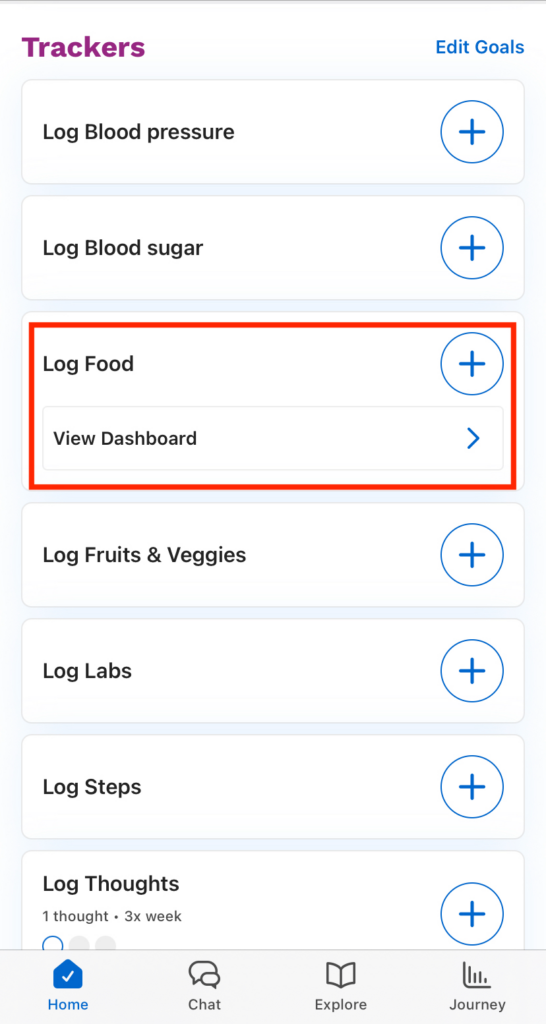
There are two ways to log your food:
Tapping the + button on the tracker
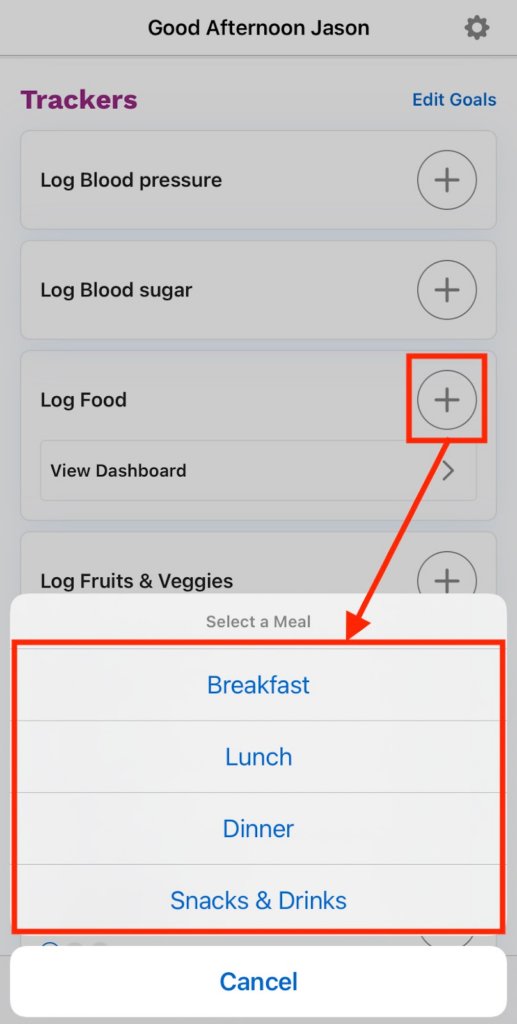
Tap the + button, then choose the meal where you want to log your food.
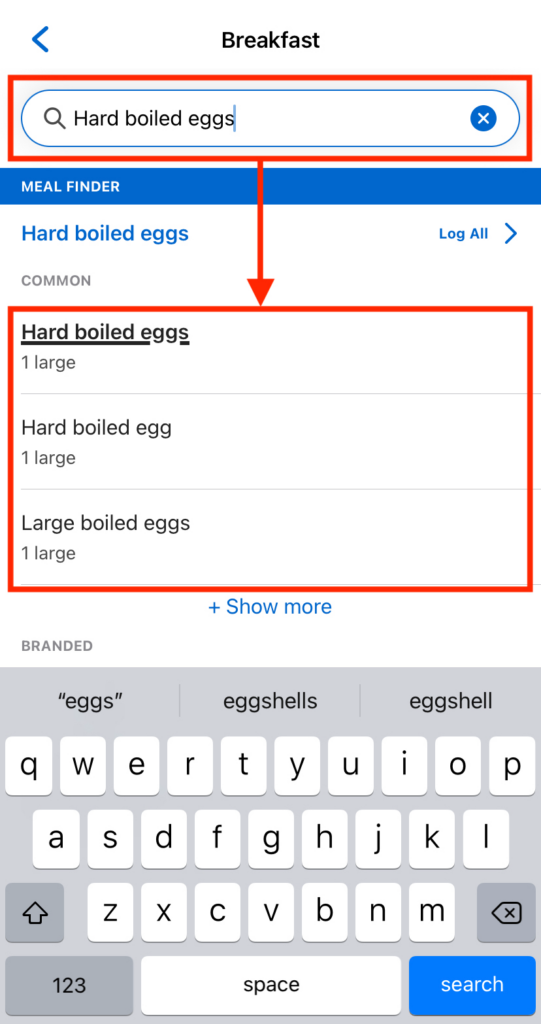
Look for your food using the search bar. You can also use your camera to scan the food’s barcode to find it quickly. Tap to select from the results below.
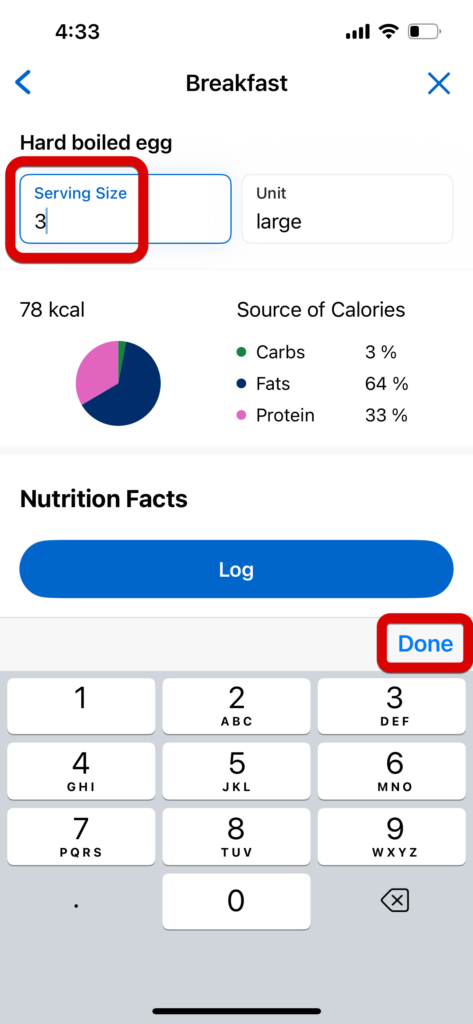
Change the serving size, if needed, tap Done, then tap Log.
Now, you’ll see your food under the meal you chose. It’ll show you how many calories it has and other nutrition info for that meal.
View Dashboard
Tap the right arrow to view dashboard, then tap the + button next to the meal where you want to log your food.
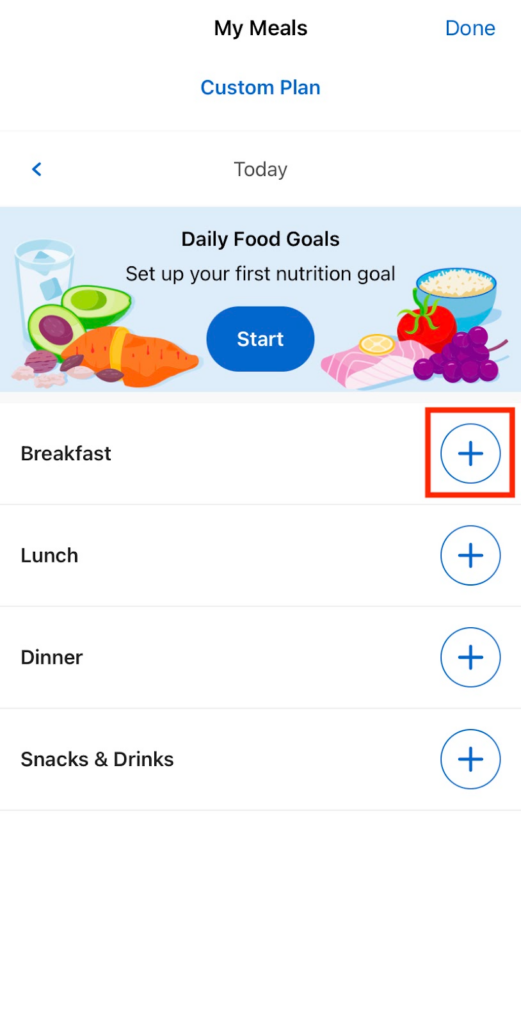
Follow the same steps above to search and log your food.
Note: For more visibility options and to set a Nutrition Pathway, see:
Some programs don’t include a food tracker by default, but it’s easy to add one! Simply send your coach a private message and ask them to enable the food tracker for you. They’ll be happy to help.
You must redeem your Fresh Funds by September 30, 2026 and spend them by December 31, 2026.
- To redeem your Fresh Funds code, you will receive an email with a link to the designated redemption page, where the unique code will be pre-populated.
- Once you select “Continue” to redeem your Fresh Funds code, you will be prompted to log in to your Instacart account or create a new one at www.instacart.com. Your Fresh Funds will appear in credits, promos, and gift cards page.
- Enter your address to see nearby stores that deliver to you. View their stock to find everything you need.
- As you shop, you can see which items are covered by Fresh Funds by the “Fresh Funds” tag listed under each item.
- Add items to your cart. If you do not see the Fresh Funds tag, make sure your app is up to date.
- Fresh Funds will be the default payment applied to your order.
- Done shopping? Select the green cart icon, review your order, and proceed to checkout.
- Choose delivery time and add delivery comments.
- During checkout, you can request the order be left at your door. This will prompt the shopper to take a picture of the order at your door before they leave.
Note: Any ineligible items, fees, or amounts exceeding your balance will be charged to your backup payment method.
Fresh Funds is an Instacart program that allows sponsors, such as Vida Health, to fund category-specific stipends, like fresh and frozen produce and pantry items. Vida determines what items and fees are eligible. Vida distributes Fresh Funds to recipients who can redeem via a digital code and shop from eligible categories on Instacart.
Vida members who logged their food for 7 consecutive days in the Vida app.
Yes. After you activate your code, you can create an Instacart account.
Once you’ve redeemed your Fresh Funds into an Instacart account, eligible Fresh Funds will be automatically applied to your total at checkout. You can toggle this off in the Payment Methods section. You will find the amount applied in your invoice at the bottom of the checkout screen.
Items eligible for Fresh Funds include a wide range of staple and perishable foods, such as beverages (coffee, tea, water); baked goods (bread, tortillas, flatbreads); dairy products (eggs, milk, yogurt); fresh produce (fruits and vegetables); deli items (olives, dips, deli meats, prepared meals); meat and seafood, including plant-based alternatives; frozen foods (fruits, vegetables, meat, seafood, and alternatives); and dried goods like grains, pasta, pantry staples, and canned items.
How do I know if an item qualifies?
When shopping online or in the Instacart app, eligible items have a Fresh Funds tag under the item.
What charges are not covered by Fresh Funds?
Items deemed ineligible will not be covered by Fresh Funds. Alcohol and tobacco are never eligible for purchase using Fresh Funds. Taxes, delivery fees, service fees and tips are covered with Fresh Funds.
Can I pay with an alternative form of payment if something isn’t eligible for Fresh Funds?
Yes, you can buy non-Fresh Funds eligible items with other forms of payment. You can also buy Fresh Funds eligible items with your debit or credit card. Simply add an additional payment method, such as a gift card, credit card or debit card, at checkout.
Yes, Instacart Fresh Funds can be used at any participating grocery store on the Instacart platform.
The full balance of the Fresh Funds stipend will automatically be applied at checkout. If the stipend amount exceeds your order total, the remaining balance will be applied to your next order.
What happens if my order total is more than my Fresh Funds balance?
Orders with non-Fresh Fund-eligible items and orders that exceed the designated Fresh Funds amount can be purchased with an alternate form of payment. You can add other payment methods, like a gift card, credit card, or debit card, at checkout.
If you need help with your Fresh Funds code or Instacart account, please contact Instacart Customer Care at http://www.instacart.com/help or call 1 -833-285-2200.